Read the transcript
Open Expenses and start a new expense.
Type the supplier, as it appears on the receipt.
Add the date on the receipt.
Enter the total paid, exactly as the receipt shows it.
Choose the category that fits. For this receipt, office supplies and postage.
Choose the receipt file. It is stored with the expense, so you can find it again when your accountant asks.
Press Save expense.
The expense is saved with its receipt attached, and it appears in your list.
An expense is one purchase: who you paid, how much, what it was for and the receipt that proves it.
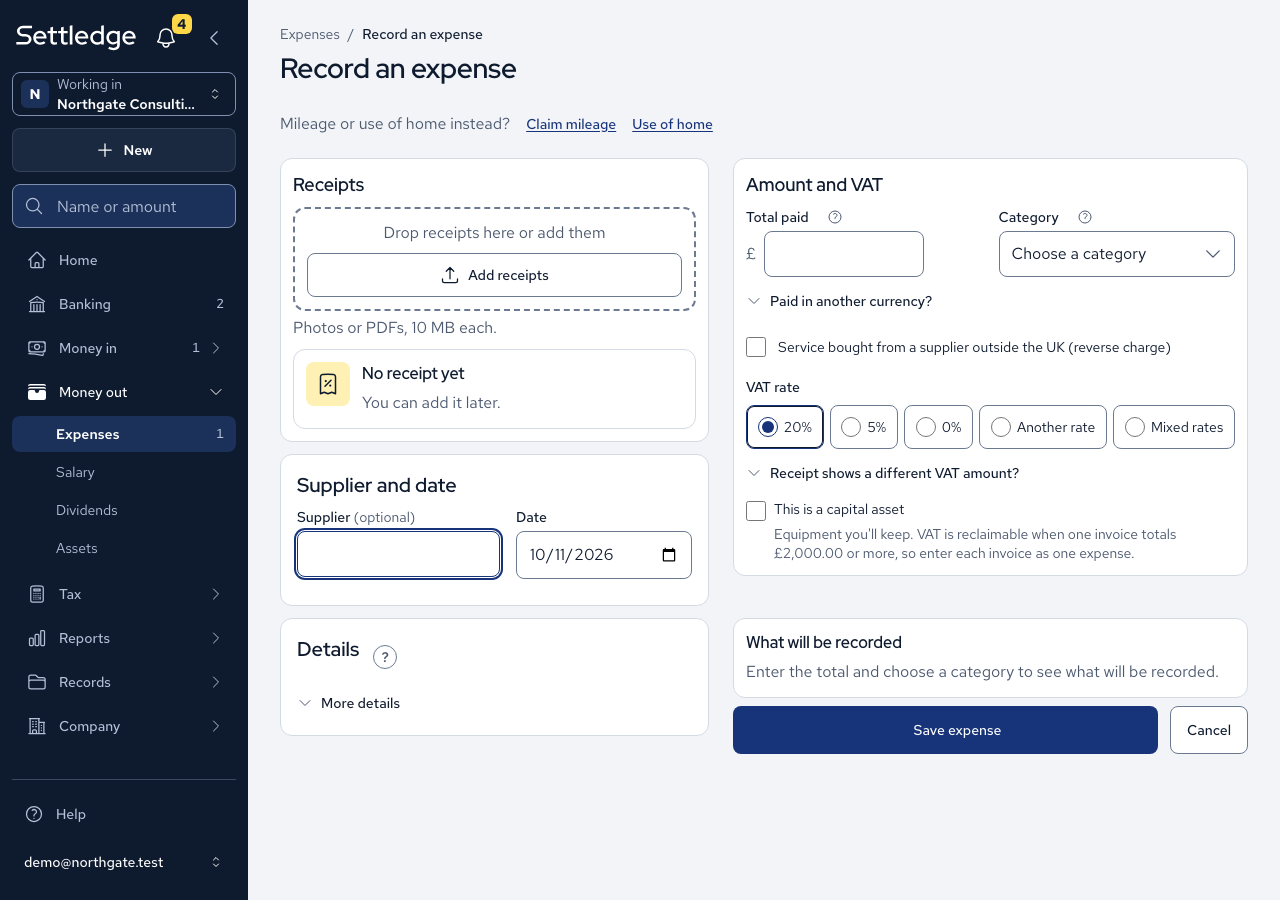
- Press New, then choose Record an expense. For mileage or use of home, choose Claim mileage or Use of home at the top of the page instead.
- Under Supplier and date, enter the Supplier. You can leave it empty. The Date starts as today, which you can change.
- Under Amount and VAT, enter Total paid including VAT, choose a Category and choose a VAT rate: 20%, 5%, 0%, Another rate or Mixed rates. The app works out the VAT.
- If the receipt shows a different VAT amount, open Receipt shows a different VAT amount? and type it in VAT amount. Your figure is kept.
- Under Details, set Who paid to The company or You, personally.
- Tick This is a capital asset only for a single purchase of £2,000 or more including VAT, since that is the one case where VAT can be reclaimed.
- Under Receipts, press Take a photo or Choose a file. Photos or PDFs are accepted, up to 10 MB each.
- To save typing, press Read details from this receipt. It fills the empty fields from your first file. Check each one, because nothing is saved yet.
- Read What will be recorded to check the figures, then press Save expense. A message names the supplier and the total.
Cases
- The VAT is recorded, but under the Flat Rate Scheme it cannot be reclaimed, except on a qualifying capital asset.
- The suggested VAT never overwrites what you typed. You see a notice instead.
- A total of £0.00 is refused, and an amount with more than two decimals is rejected rather than rounded.
- A refund is entered as a negative total, and its VAT is negative too.
- One invoice of £2,400.00 covering three items is one capital asset. Three invoices of £800.00 are three expenses, each below the threshold.
- If a photo is too large or the wrong type, the expense still saves and tells you the photo was not attached.
- Read details from this receipt is there only when reading receipts is switched on for your company. Category and the capital-asset tick are never filled from a receipt.
- A receipt in another currency fills no money field. The screen names the currency: type the amount you actually paid in Total paid. Paid in another currency? holds the currency and the original amount.
- Service bought from a supplier outside the UK (reverse charge) is for services from abroad, not goods. Ask your accountant whether a card-processing fee is reverse-charged.
- A receipt is not required to save an expense, and an expense without one says so. Uploading the same file twice warns you but never refuses it.
- A company that is not VAT registered records the whole amount as the cost.
Good practice
- Keep one invoice as one expense, even with several receipts attached. An itemised receipt plus the card slip is one purchase.
- Say honestly who paid. An expense you paid personally goes on your director's loan ledger, and it is never matched to a company bank line.
- Attach the receipt when you record the expense, while you still have it to hand.