A contract ties one customer's work together: the payment schedule, the invoices you raise for it and the expenses it causes. Its page shows what it has brought in and cost.
- Open Money in, then Contracts, and press Add a contract. A contract is for a saved customer, so with none yet the page asks you to add the customer first (see Raise and send an invoice).
- Choose the Customer, then fill in Name, Start and End. The Payment schedule is optional, but it takes all four fields or none: Amount per payment, How often, How many payments and First payment due. Press Save contract.
- When you raise an invoice for that customer, choose the contract in Contract on the draft. Credit notes and split parts keep it.
- When you record an expense for the work, choose the same contract in Contract.
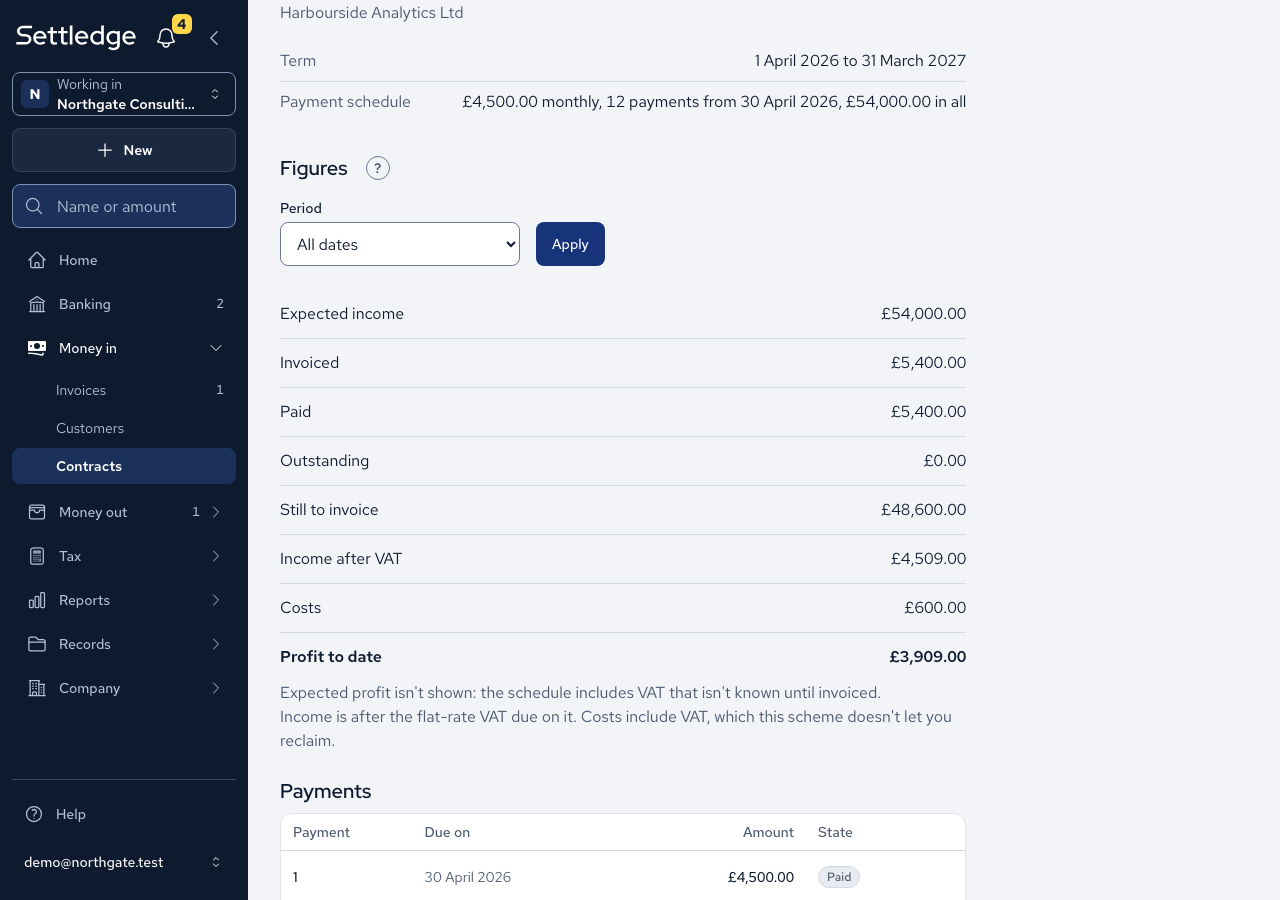
- Open the contract. Figures lists Expected income, Invoiced, Paid, Outstanding, Still to invoice, Income after VAT, Costs and Profit to date. Under Payments are the instalments with their state (Paid, Due or Upcoming).
- To see one stretch of time, choose a Period or Custom dates, enter From and To, and press Apply. Invoices count when issued, payments when received and costs on their own date. Expected income and the schedule are left out.
Cases
- Income after VAT and Costs are net of VAT, and the line under the figures says how for your scheme. Standard: "Income and costs are after VAT. VAT you can't reclaim stays in costs." Flat Rate: "Income is after the flat-rate VAT due on it. Costs include VAT, which this scheme doesn't let you reclaim." Not registered: "No VAT is taken off: the company isn't registered for VAT."
- Under the Flat Rate Scheme the VAT taken off is the flat rate on each payment, at the rate in force on that document's tax point. A capital asset of £2,000 or more is costed without its VAT.
- A document uses the scheme in force at its own tax point, so a contract that spans a scheme change adds "Earlier documents follow the scheme that applied on their own date."
- Invoiced, Paid, Outstanding and Still to invoice stay VAT-inclusive, because they say what the customer was billed and owes.
- A VAT-registered company sees no Expected profit: "Expected profit isn't shown: the schedule includes VAT that isn't known until invoiced."
- A contract belongs to one customer. Choosing it on a draft for someone else is refused: "This contract is with Harbourside Analytics Ltd. Pick Harbourside Analytics Ltd as the customer."
- The contracts list and its CSV show Paid, Income after VAT and Profit to date for each contract.
Good practice
- Name the contract on every invoice and expense for the work as you record them, so Profit to date is complete.
- Read the line under the figures before you compare contracts. It says whether costs include VAT.