Your profit and your Corporation Tax estimate count a sales invoice as income on the day it is issued, and a credit note on its own date, whatever your VAT method. This is how company profit is worked out. Your VAT return follows its own method.
- Open Reports, then Profit and loss, choose a Period and press Apply. Invoices appear as one line, Invoiced sales.
- A sales receipt that no invoice claims counts as well, on the day it reached your bank, in its own category line. Money allocated to an invoice is not counted again.
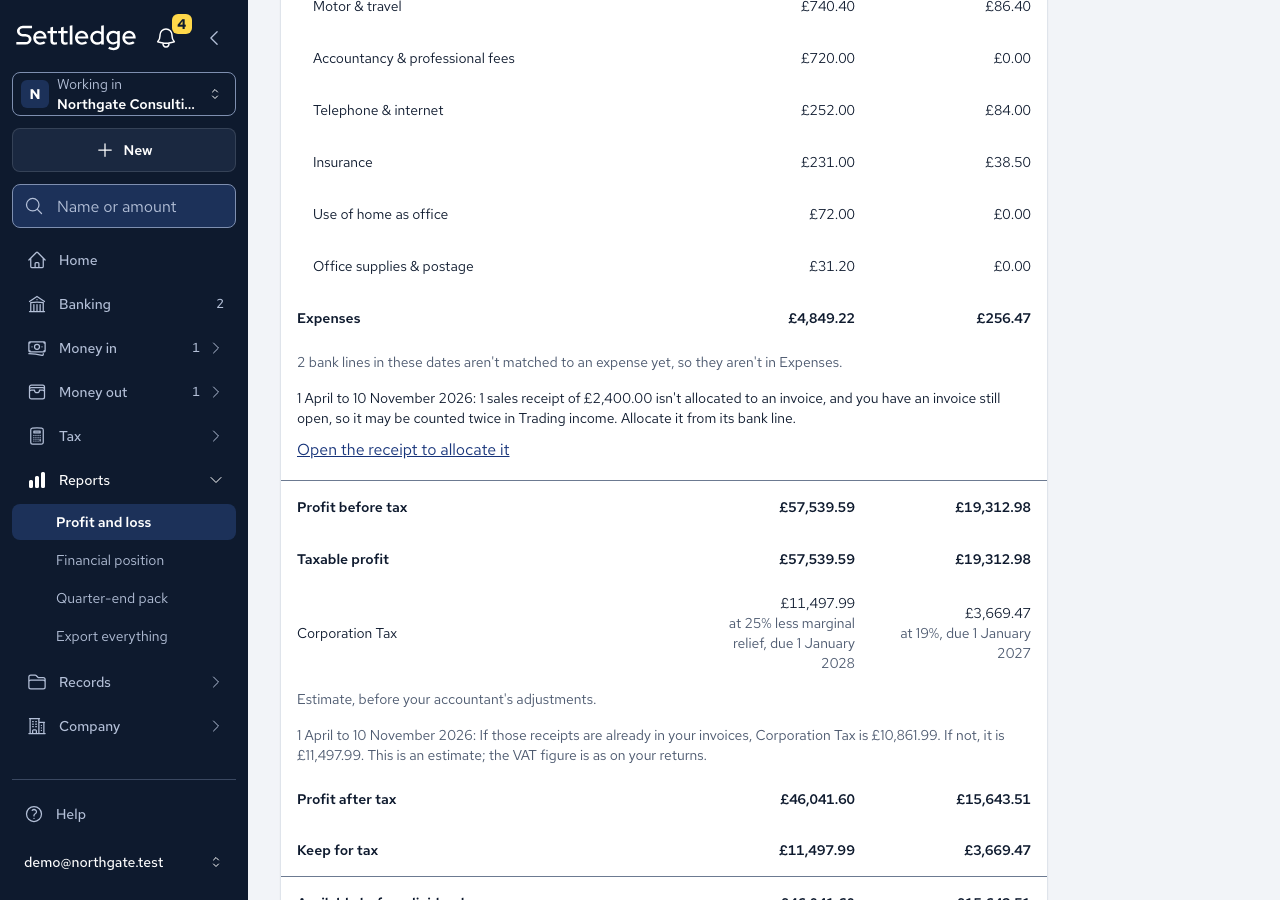
- If such a receipt exists while you still have an open invoice, a sentence under Expenses warns that it may be counted twice in Trading income, with the count and the total, for example "1 sales receipt of £2,400.00 isn't allocated to an invoice, and you have an invoice still open, so it may be counted twice in Trading income. Allocate it from its bank line."
- Press Open the receipt to allocate it (or Open the first receipt to allocate it when there are several), then press Allocate on the invoice it paid.
- Under the Corporation Tax line, read the range: "If those receipts are already in your invoices, Corporation Tax is £10,861.99. If not, it is £11,497.99." The app cannot tell which is true, so it shows both until you allocate.
Cases
- The receipts keep counting in the income figure. The warning flags them and the range bounds the tax; neither changes the profit.
- A receipt with no invoice behind it is real income, so it stays counted.
- Refunds, interest and other non-trading income, fully allocated lines, and credit notes never trigger the warning.
- Under a cash VAT method, "VAT due" follows the payments you filed on, so a payment that crosses the period boundary sits in a different period from its invoice. The statement says so under that line.
- Corporation Tax is an estimate, before your accountant's adjustments.
Good practice
- Allocate each payment to its invoice from the bank line, so the warning clears and the estimate is a single figure.
- Give your accountant the estimate only as a guide. The filed figures come from your returns.